> For the complete documentation index, see [llms.txt](https://ajuda.cardapioweb.com/llms.txt). Markdown versions of documentation pages are available by appending `.md` to page URLs; this page is available as [Markdown](https://ajuda.cardapioweb.com/gestao/configuracoes.md).
# Configurações
A tela de Configurações é onde você pode ajustar o funcionamento do sistema de acordo com as necessidades do seu negócio.
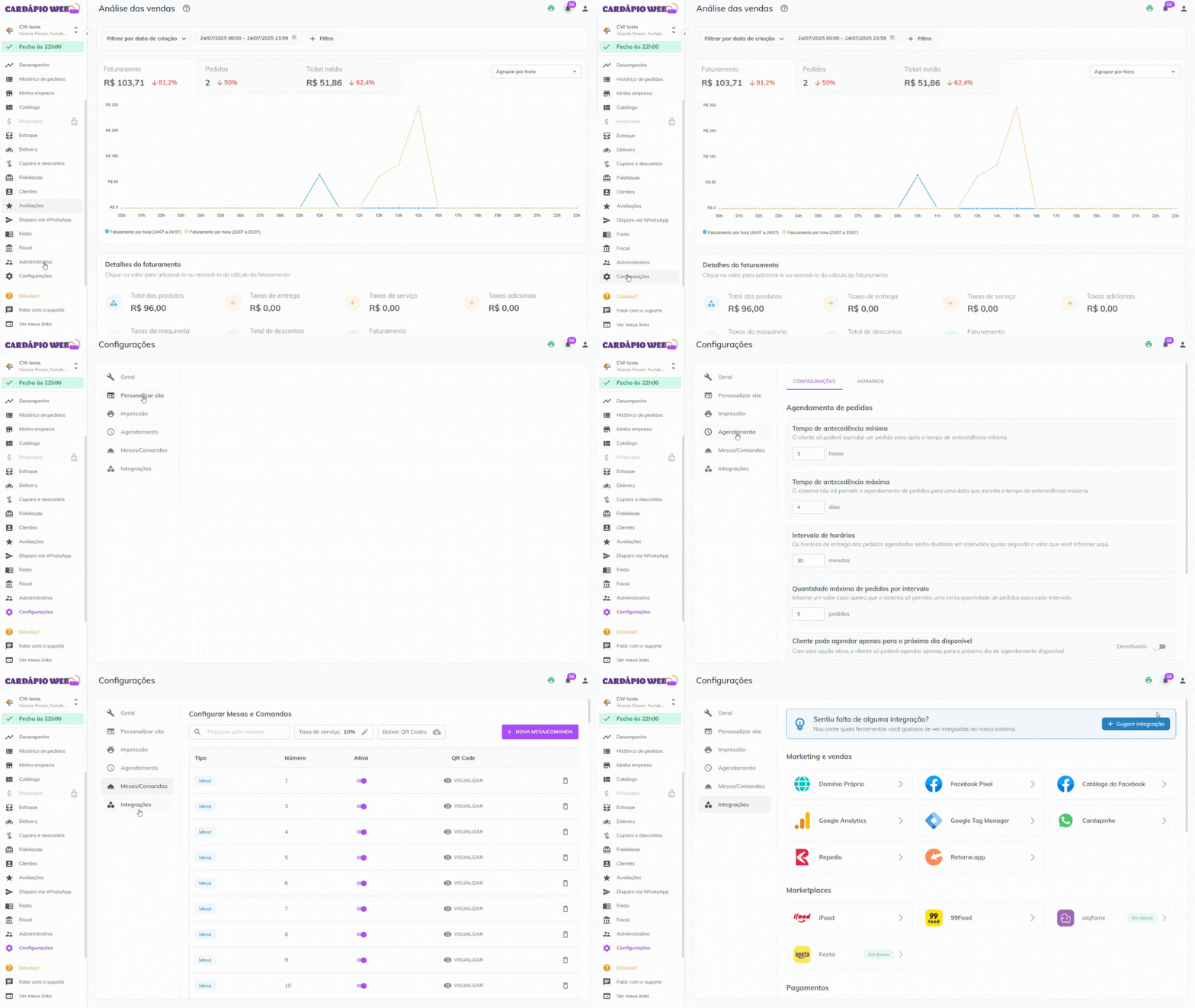
Dentro dessa área, você encontrará diferentes abas que permitem definir preferências de operação, personalização do site de vendas, regras para agendamentos, configurações de mesas e comandas, além do acesso a recursos de impressão e integrações.
Neste conteúdo, vamos explorar cada uma dessas abas com explicações claras e práticas sobre:
* **Configurações Gerais**: escolha de tipos de pedidos, notificações e comportamentos automáticos do sistema.
* **Personalizar Site**: controle sobre o que será exibido ou não para seus clientes no site de vendas.
* **Impressão**: onde encontrar o conteúdo completo sobre como configurar impressoras.
* **Agendamento**: como definir regras e horários para pedidos agendados.
* **Mesas/Comandas**: criação e gerenciamento de mesas/comandas com QR Codes e taxa de serviço.
* **Integrações**: onde acessar as integrações disponíveis no sistema.
Cada aba possui sua função específica e, juntas, ajudam a adaptar o sistema à realidade do seu negócio, tornando a gestão mais simples, automatizada e eficiente. 🚀
---
# Agent Instructions
This documentation is published with GitBook. GitBook is the documentation platform designed so that both humans and AI agents can read, navigate, and reason over technical content effectively. Learn more at gitbook.com.
## Querying This Documentation
If you need additional information that is not directly available in this page, you can query the documentation by asking a question.
Perform an HTTP GET request on the following URL with the `ask` and `goal` query parameters:
```
GET https://ajuda.cardapioweb.com/gestao/configuracoes.md?ask=&goal=
```
`ask` is the immediate question: it should be specific, self-contained, and written in natural language.
`goal` is what the user is ultimately trying to achieve, the reason they need the answer. Sharing it helps GitBook give you a better, more relevant answer. A goal is most helpful when it describes the outcome the user wants rather than restating the question. For example, with `ask=how do I create an API token`, a goal like `automate deployments from our CI pipeline` lets GitBook tailor the answer to that use case.
The response will contain a direct answer to the question and relevant excerpts and sources from the documentation.
Use this mechanism when the answer is not explicitly present in the current page, you need clarification or additional context, or you want to retrieve related documentation sections.